Clarity on the chart.
Discipline in your trades.

An invite-only TradingView indicator engineered for close-confirmed execution, macro cycle structure, and multi-condition automated alerts.

Works on a free TradingView account. No paid plan required.

Usually ready within 1 hour
Pay with USDT

This is charting software, not a broker, fund, or automated execution service. Past performance and indicators do not guarantee future profit. Trading financial markets carries substantial risk of loss. Terms.
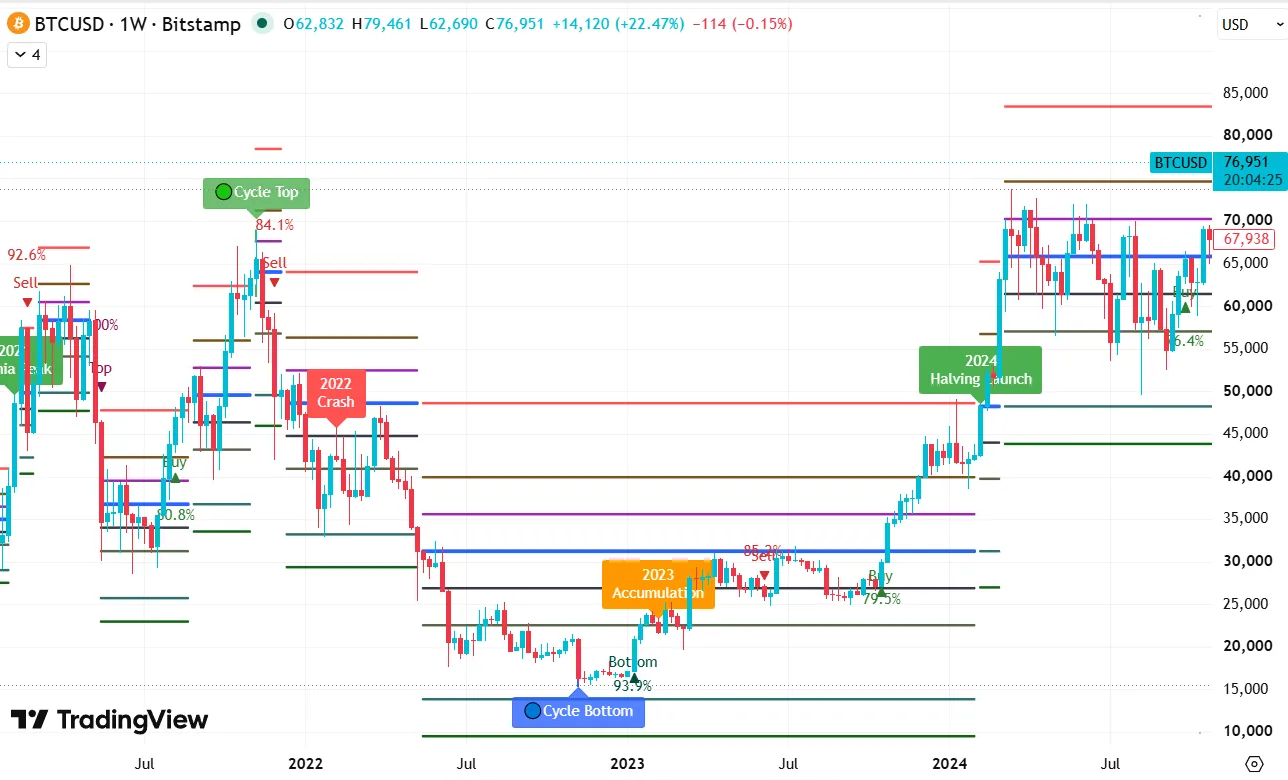
Bitcoin weekly chart with X-AI cycle labels

BTC weekly cycle

Weekly

TradingView chart screenshot · not a guaranteed track record
Engineered for Rule-Based Trading

From macro cycle turning points to close-confirmed execution triggers.

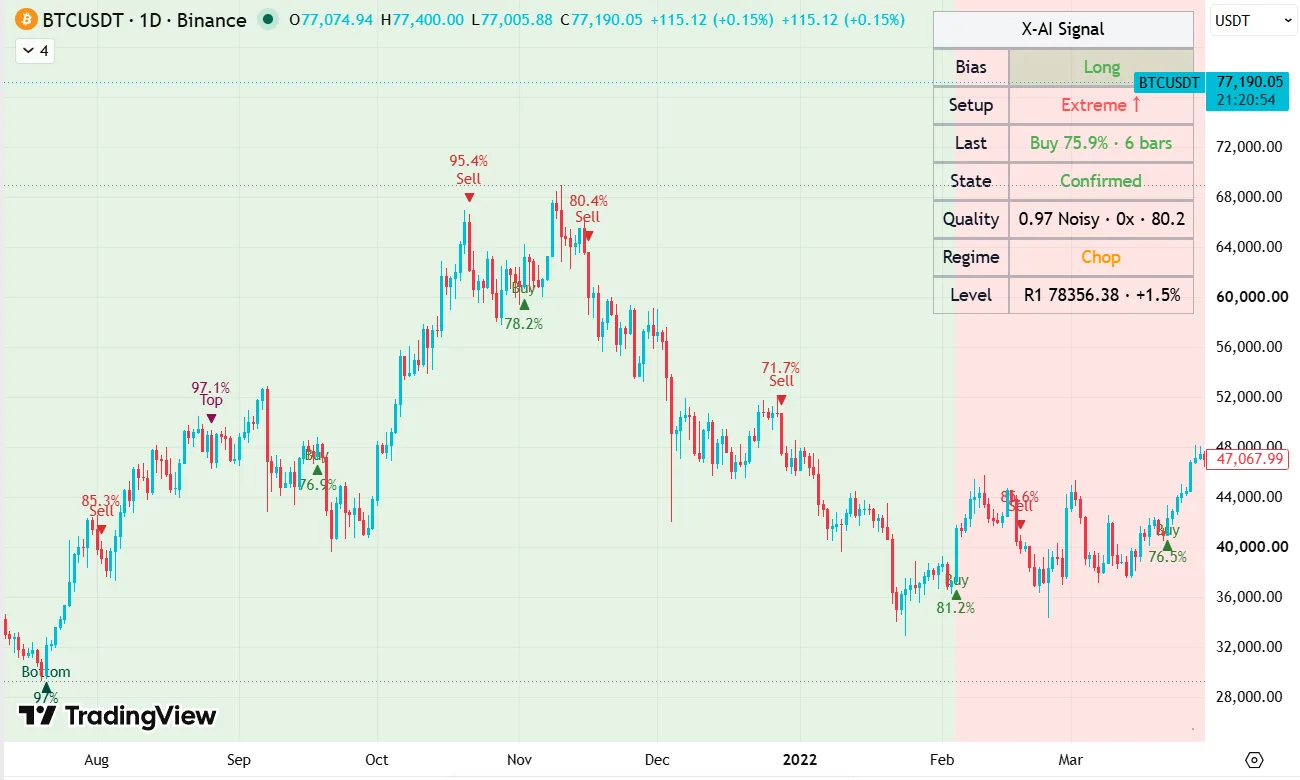
Bitcoin BTCUSDT daily chart with X-AI overlay marks
Bitcoin (BTCUSDT) Daily

01

Close-Confirmed Signals (Zero Repainting)

Signals calculate dynamically on live candles and lock permanently at candle close. No retroactive shifts or repainting—giving subjective traders a reliable, rule-based baseline.

Bitcoin weekly chart with X-AI cycle labels
BTC Weekly Cycle Weekly

02

Macro Cycle Detection & Structure

Weekly cycle modeling automatically maps generational tops, deep bottoms, and accumulation zones, complete with dynamic algorithmic support and resistance levels.

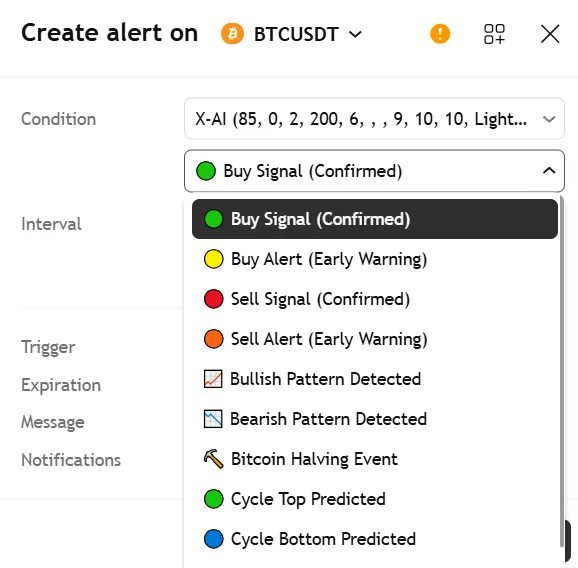
TradingView Create alert window showing X-AI script conditions
TradingView Alerts TradingView

03

Multi-Condition Alert Engine

Native integration with TradingView alerts. Configure triggers for confirmed entries/exits, early momentum warnings, structural patterns, cycle pivots, and Bitcoin halving events.

How It Works

Four simple steps to activate the X-AI invite-only indicator on your TradingView chart.

1

Submit details & payment

Enter your TradingView username and send USDT via BEP-20 (BSC, lowest fee) or TRC-20.

2

Direct cloud authorization

Our system verifies payment and grants invite-only access directly to your TradingView account, usually within 1 hour.

3

Add indicator to chart

Open any TradingView chart → Indicators → Invite-only scripts, then click X-AI to apply.

4

Execute with discipline

Analyze close-confirmed marks, macro cycle structure, and key levels. Set native alerts and trade with discipline at your own exchange.

Pricing & Access

Full monthly access to the X-AI TradingView indicator suite. Transparent pricing.

Monthly License

Monthly License

$69 USDT / month
  • ✓
    Full access to the X-AI TradingView indicator suite
  • ✓
    Direct checkout with USDT (BEP-20 or TRC-20)
  • ✓
    Compatible with Free (Basic) TradingView accounts
  • ✓
    Direct account authorization (Usually within 1 hour)
  • ✓
    Zero recurring debits · Manual monthly renewal

Pay directly with USDT from any wallet. No credit card required.

FAQ

Does X-AI guarantee trading profit? ▼
No legitimate algorithm or indicator can guarantee profit in financial markets. X-AI provides quantitative edge, macro cycle structure, and non-repainting execution marks to give you an objective analytical framework. Trade sizing, execution, and risk management remain entirely in your control.
Do the signals repaint or disappear after candle close? ▼
Zero repainting on closed candles. While an active candle is forming in real time, calculations update dynamically. Once the candle closes, the signal permanently locks in place and will never shift, disappear, or alter on historical charts.
Which markets and timeframes work best? ▼
X-AI works across any asset available on TradingView: Crypto (BTC, ETH, Altcoins), Equities (US & Global Stocks), Forex, Commodities (Gold, Silver, Oil), and Macro Indices (DXY, SPX).

For swing and position trading, the 4-Hour (4H) and Daily (1D) timeframes deliver the highest signal-to-noise ratio. For macro market cycles, the Weekly (1W) timeframe is recommended. Intraday timeframes (15m/5m) are supported but naturally experience higher market volatility noise.
Do I need a paid TradingView plan? Can I use it on mobile? ▼
No paid plan required. X-AI works seamlessly on the Basic (Free) TradingView plan. Because TradingView operates in the cloud, once we authorize your username, the indicator automatically syncs across the TradingView Web app, Desktop application, and official iOS / Android / iPad apps.
How do I get access after payment? How does billing work? ▼
  1. Click Subscribe now and enter your TradingView username and notification email.
  2. Send the exact USDT amount via BEP-20 (BSC, lower fee) or TRC-20 (Tron).
  3. Click I've sent the payment to submit your order.
We verify payment and grant invite-only access directly to your TradingView account, usually within 1 hour. Open any chart → Indicators → Invite-only scripts to apply.

No auto-renewals: Each payment grants 1 full month of access with zero recurring card charges. You choose if and when to manually renew.